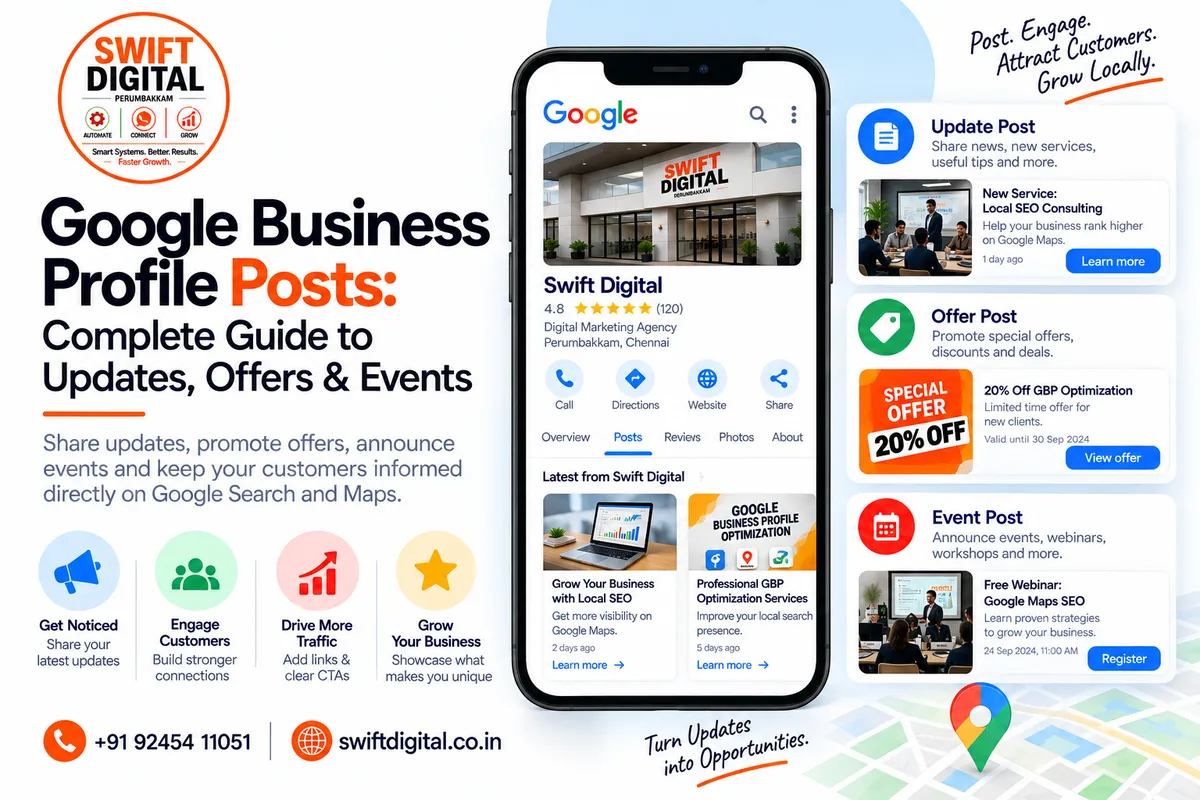
Google Business Profile Posts: Updates, Offers & Events
Google Business Profile posts give businesses a way to share timely information directly with customers on Google Search and Google Maps.
You can use posts to communicate business updates, offers, events, announcements, and other useful information. Google says posts can include text, photos, videos, and action buttons depending on the post type.
For local businesses, this creates another opportunity to keep customers informed and direct them toward useful actions such as learning more, booking, ordering, or attending an event.
However, GBP posts should not be treated as a shortcut to guaranteed Google Maps rankings. They are primarily a customer communication and engagement feature.
What Are Google Business Profile Posts?
Google Business Profile posts are updates that businesses can publish directly through their Business Profile.
Depending on the available features, businesses can create:
Updates
Offers
Events
Posts can appear in areas such as the Updates or Overview sections of a Business Profile on mobile, and in the From the owner section on desktop.
This makes posts useful for communicating information that may change over time.
Why Use Google Business Profile Posts?
Posts can help you:
Share current business information
Promote offers
Announce events
Introduce new services
Share business news
Explain useful information
Showcase products or services
Direct customers to relevant website pages
Keep your Business Profile more informative
Google specifically describes posts as a way to share announcements, offers, updates, and event details directly with customers on Search and Maps.
Types of Google Business Profile Posts
1. Update Posts
Update posts are useful for general business information.
Examples include:
New service announcements
Business news
New products
Helpful tips
Customer information
Seasonal updates
Company announcements
Google says update posts can include a description, photo, video, and an action button with a link.
Example
New Service: Google Business Profile Optimization
We now offer Google Business Profile optimization services for local businesses looking to improve their online presence. Learn about our approach, services, and local SEO process.
Button: Learn More
Link: Your relevant service page
2. Offer Posts
Offer posts are designed for promotions, sales, or special deals.
Google's current guidance says offer posts require:
Offer title
Start date
End date
They can also include:
Description
Photo
Video
Coupon code
Link
Terms and conditions
An offer post automatically includes a View offer button.
Example
Local SEO Consultation Offer
Book a local SEO consultation this month and learn how to identify opportunities to improve your Google Business Profile and local search presence.
Offer period: September 20–30
Terms: Subject to availability.
Only publish an offer that your business genuinely provides.
3. Event Posts
Event posts can be used to promote events associated with your business.
Examples:
Workshops
Webinars
Open houses
Business seminars
Training sessions
Product launches
Community events
Google allows event posts to include:
Event title
Start date
End date
Start time
End time
Description
Photo
Video
Action button
If no start or end time is supplied, Google says the event can display as lasting 24 hours on the specified dates.
How to Create a Google Business Profile Post
The current Google process is:
Step 1: Open Your Business Profile
Sign in to the Google account that manages your Business Profile.
Step 2: Open Posts
Go to your Business Profile and select Posts.
Step 3: Select Add Post
Choose the post type:
Update
Offer
Event
Step 4: Add Your Content
Depending on the post type, add:
Description
Image or video
Dates
Links
Action button
Offer details
Step 5: Preview Your Post
Check spelling, links, dates, images, and calls to action.
Step 6: Publish
Select Post when you're ready.
Google also currently supports scheduling and recurring posts in its Business Profile posting workflow.
What Should You Post?
The best content depends on your business.
Here are practical ideas.
Service Businesses
Post about:
New services
Seasonal services
Frequently asked questions
Service explanations
Customer education
Before-and-after projects
Important announcements
Restaurants
Post about:
New menu items
Special menus
Events
Seasonal dishes
Offers
Holiday hours
Retail Stores
Post about:
New products
Collections
Promotions
Seasonal products
Store events
Product education
Professional Services
Post about:
Industry tips
New services
Educational guides
Workshops
Events
Business announcements
Frequently asked questions
Google Business Profile Post Ideas for a Digital Marketing Agency
For a digital marketing agency such as Swift Digital, possible posts include:
Post 1 — Educational
5 Google Business Profile Optimization Tips
Make sure your business category, services, hours, website, and business information accurately represent your business. A complete profile gives customers clearer information about what you offer.
Post 2 — New Service
Google Maps SEO Services
Looking to strengthen your local search presence? Our Google Maps SEO service focuses on Business Profile optimization, local relevance, website signals, and sustainable local SEO practices.
Button: Learn More
Post 3 — FAQ
Does Google Maps SEO Guarantee a #1 Ranking?
No legitimate SEO provider can guarantee a specific Google Maps position. Local results depend on factors including relevance, distance, and prominence.
Button: Learn More
Post 4 — Business Update
New Local SEO Resources
We've published a new collection of Google Business Profile guides covering categories, reviews, services, photos, Maps SEO, and more.
Button: Learn More
Create Posts Around Customer Questions
One effective way to develop content ideas is to look at questions customers frequently ask.
For example:
Question:
"How do I get more Google reviews?"
Post:
How to Build a Genuine Google Review Strategy
Question:
"Why doesn't my business appear on Google Maps?"
Post:
Why Your Business May Not Appear Prominently in Local Search
Question:
"What category should I choose?"
Post:
How to Choose the Right Google Business Profile Category
This creates content that is connected to real customer needs.
Use a Clear Call to Action
When appropriate, give customers a next step.
Examples include:
Learn More
Book
Order Online
Sign Up
Call Now
Visit Website
Google says update and event posts can include an action button with a link directing customers to a website where they can complete the intended action, such as booking or ordering.
Your landing page should match the post.
For example:
Post: Google Business Profile Optimization
Button: Learn More
Destination:
Your Google Business Profile optimization service page
Avoid sending customers to an unrelated homepage when a more relevant page exists.
Don't Put Phone Numbers in the Post Description
This is an important current Google policy point.
Google's Business Profile posts content policy says posts should not include phone numbers in the post content. Google says businesses can instead use a Call now button that uses the verified phone number on the Business Profile.
So avoid:
Call us at +91 XXXXX XXXXX
Instead, use the appropriate call-to-action feature when available.
Use High-Quality Images
Visual content can make posts easier to understand.
For example:
Service post:
Use a genuine image representing the service.
Offer post:
Use a relevant promotional image.
Event post:
Use the event's branding or a suitable event photograph.
Business update:
Use an authentic business image.
Avoid misleading imagery.
Google's content policies apply to photos, videos, and post content.
Keep Your Posts Relevant
A GBP post should have a clear connection to your business.
Good examples:
New service
Business announcement
Useful customer tip
Relevant offer
Event
Product update
Seasonal information
Avoid unrelated content designed only to insert popular keywords.
For example, a local accounting firm shouldn't publish unrelated posts about restaurants simply because restaurant-related searches are popular.
Use Natural Keywords
Keywords can naturally appear in useful content.
For example:
Our Google Business Profile optimization service helps local businesses improve the accuracy, completeness, and customer experience of their Business Profile.
This is better than:
Google Business Profile SEO Google Maps SEO GBP SEO Google My Business SEO near me best SEO company...
Write for customers first.
Don't Treat Posts as Keyword-Stuffing Opportunities
A common mistake is creating posts filled with repetitive location and keyword variations.
For example:
SEO Chennai | SEO Perumbakkam | SEO Agency Chennai | SEO Company Chennai | Best SEO Chennai
This doesn't provide meaningful information.
Instead:
How Local SEO Helps Chennai Businesses
Learn how accurate Business Profile information, relevant services, genuine reviews, and useful website content can help customers discover and understand your business.
How Often Should You Publish GBP Posts?
There is no universal posting frequency that guarantees better local rankings.
Instead of posting simply to hit a number, use a sustainable schedule based on your business activity.
For example:
Weekly
1 useful educational update
1 service or business update when relevant
Monthly
Seasonal information
Special offer where applicable
New service announcement
Event announcement
As Needed
Holiday hours
Temporary changes
Important announcements
New products
Events
The important principle is useful and current information.
Google's current documentation also notes that posts older than six months are archived unless a date range has been set.
Can You Schedule Google Business Profile Posts?
Google's current Business Profile posting interface supports scheduling posts for a later date and recurring posts for supported workflows.
This can be useful for businesses that prepare content in advance.
However, scheduled content should still be reviewed regularly.
Don't schedule content months in advance and forget about it.
If an offer expires or business information changes, update the post.
Monitor Your Published Posts
After publishing, check that:
The post is live
The image displays correctly
The link works
The call-to-action works
Dates are correct
Offer information is accurate
The content still represents the business
Google reviews posts for compliance with its content policy, and post visibility can depend on the post's status.
What Happens to Old Posts?
Google currently says posts older than six months are archived unless a date range is set.
This means businesses should pay particular attention to posts containing:
Offers
Event dates
Temporary promotions
Seasonal information
Expiring services
Don't leave outdated promotions looking current.
Google Business Profile Posts and SEO
Posts can contribute to a better customer experience by providing current information directly on your Business Profile.
However, avoid claims such as:
"Posting every day will make you rank #1."
Google's local ranking system is based primarily on relevance, distance, and prominence, and Google does not provide a guaranteed ranking formula or promise a particular position from posting frequency.
Use GBP posts primarily to:
Inform → Engage → Educate → Promote → Direct customers to useful actions
30-Day Google Business Profile Posting Plan
Week 1
Post 1
Educational Update
Topic:
"What Is Google Business Profile?"
Post 2
Service Update
Topic:
"Google Business Profile Optimization"
Week 2
Post 3
Customer FAQ
Topic:
"How Do Google Maps Local Rankings Work?"
Post 4
Educational Update
Topic:
"How to Choose the Right GBP Category"
Week 3
Post 5
Service Highlight
Topic:
"Local SEO Services"
Post 6
Review Education
Topic:
"How to Build a Genuine Google Review Strategy"
Week 4
Post 7
Visual Update
Topic:
"Why Business Photos Matter"
Post 8
Business Update
Topic:
"New Local SEO Resource or Guide"
This is a framework, not a requirement to publish exactly eight posts every month.
Google Business Profile Post Checklist
Before publishing, check:
Correct post type selected
Topic is relevant to the business
Information is accurate
Spelling checked
Dates checked
Image is relevant
Image is high quality
Link works
CTA matches the destination
No phone number in post description
No keyword stuffing
No misleading claims
Offer terms are clear
Event dates are correct
Expired information is removed or updated
Common Google Business Profile Post Mistakes
1. Posting Just for the Sake of Posting
Every post should provide some value.
2. Keyword Stuffing
Don't turn your posts into keyword lists.
3. Using Unrelated Content
Stay relevant to your business and customers.
4. Including Phone Numbers in Post Text
Google's posts policy prohibits phone numbers in post content. Use the appropriate call button instead.
5. Sending Customers to Irrelevant Pages
Match the CTA and landing page to the post.
6. Leaving Expired Offers Live
Keep dates and promotional information current.
7. Making Unsupported Guarantees
Avoid claims such as guaranteed rankings, guaranteed leads, or guaranteed Google approval.
8. Using Misleading Images
Your imagery should accurately represent the business or promotion.
Frequently Asked Questions
What can I post on my Google Business Profile?
You can publish updates, offers, and events. Posts can include text, photos, videos, and relevant action buttons depending on the post type.
Do Google Business Profile posts improve rankings?
Posts are primarily a way to communicate current information to customers. They should not be treated as a guaranteed local ranking factor or a method for securing a particular Google Maps position.
How often should I post on Google Business Profile?
There is no universal posting frequency that guarantees a ranking improvement. Publish when you have useful, relevant information to share and maintain a sustainable schedule.
Can I schedule GBP posts?
Google's current posting workflow supports scheduling and recurring posts in supported cases.
How long do Google Business Profile posts remain visible?
Google says posts older than six months are archived unless a date range is set.
Can I add my phone number to a GBP post?
Google's current posts content policy says phone numbers should not be included in the post content. Use the appropriate call-to-action button instead.
Can I add links to GBP posts?
Yes. Depending on the post type, you can add an action button with a link to a relevant webpage.
Final Thoughts
Google Business Profile posts are a useful way to keep customers informed directly through Google Search and Maps.
The best posts are not complicated.
They provide something useful:
An update → An answer → An offer → An event → A new service → A helpful resource
Focus on relevance, accuracy, clear calls to action, useful visuals, and current information.
Don't use posts as a shortcut for keyword stuffing or guaranteed rankings. Instead, make them part of a broader local SEO strategy that includes an accurate Business Profile, relevant categories, services, genuine reviews, quality photos, a useful website, and a strong customer experience.


