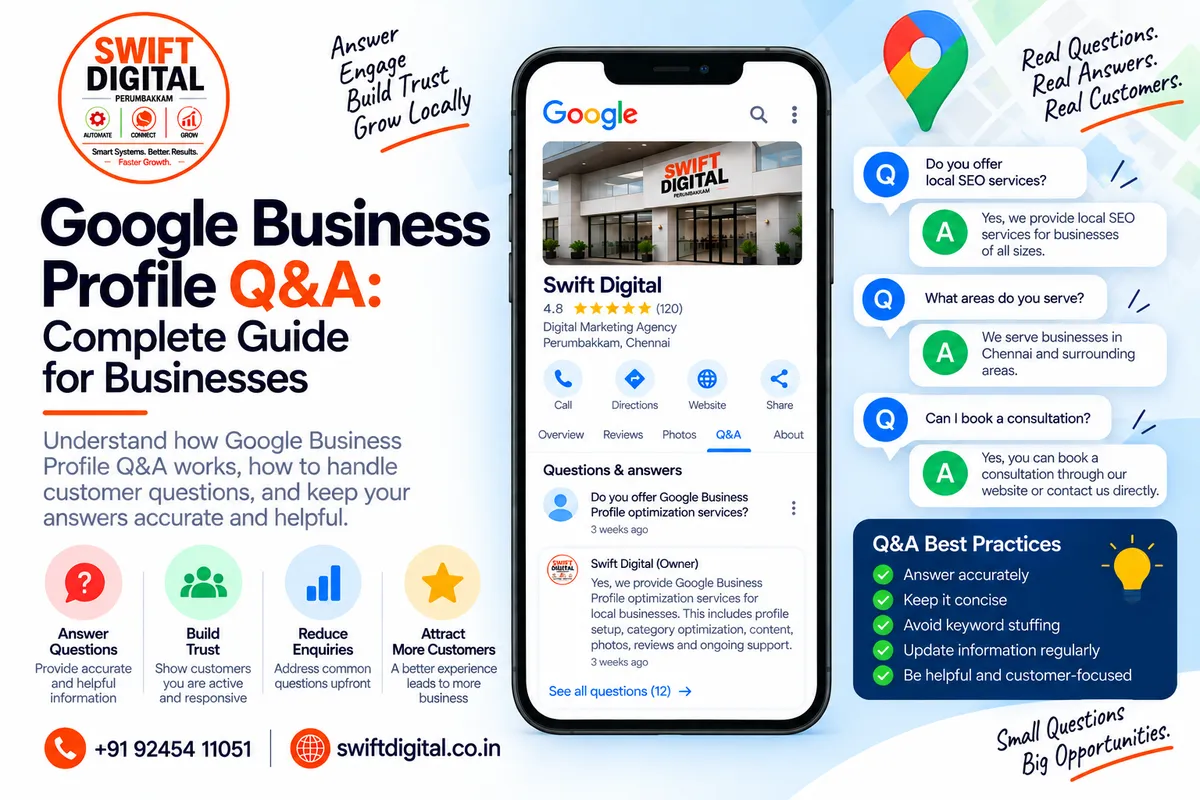
Google Business Profile Q&A: Complete Guide for Businesses
Customers often have questions before they contact or visit a local business.
They may want to know:
Do you offer this service?
Do you accept appointments?
Do you have parking?
Do you serve this area?
What payment methods do you accept?
Are you open on Sundays?
Do you provide home service?
Google Business Profile has historically provided a Questions & Answers (Q&A) feature that allowed customers to ask questions about businesses and allowed business owners and other users to provide answers.
However, Google's Q&A functionality has been changing. Google currently notes that Q&A availability can vary by business category and region, while a December 2025 Google Business Profile Community announcement from a Google employee described changes designed to provide customers with fresher, aggregated answers instead of relying only on long lists of individual FAQs.
That means businesses should focus less on trying to "game" a Q&A section and more on keeping their Business Profile information accurate, complete, and useful.
What Is Google Business Profile Q&A?
Google Business Profile Q&A is a feature associated with a business's presence on Google Maps and Search.
Historically, customers could ask questions about a business, while businesses and other users could answer them.
Google's current documentation states that business owners and people who manage a Business Profile can answer questions about their business in the Q&A section, although the feature is available only for selected categories and regions and its appearance and functionality can change.
Google has also been evolving how questions are handled.
In a December 2025 announcement, a Google employee explained that Google was introducing changes that allow customers to ask questions directly in Maps and receive answers based on business information, existing answers, and relevant reviews.
So the important lesson is:
Don't build your local SEO strategy around one particular Q&A interface. Build your profile around accurate information that Google and customers can use.
Why Are Customer Questions Important?
Questions often reveal the information customers need before taking action.
For example, a customer searching for a dental clinic might want to know:
"Does this clinic accept emergency appointments?"
A customer looking for a digital marketing agency might ask:
"Do you provide Google Business Profile optimization?"
A restaurant customer might ask:
"Do you have vegetarian options?"
These questions represent real customer concerns.
Understanding them can help you identify information gaps in your:
Business Profile
Services
Website
Service pages
Contact information
Business attributes
Customer communication
Google Q&A Is Not the Same as Your Website FAQ
A website FAQ is controlled by the business.
Google Business Profile information is displayed within Google's ecosystem.
A website FAQ might answer:
What areas do you serve?
A Business Profile may contain information about:
Service area
Address
Hours
Services
Contact options
Attributes
Google uses information from multiple sources to maintain local business information, so keeping your official information accurate and consistent is important.
How Google Business Profile Q&A Has Changed
This is an important update for anyone following older GBP tutorials.
Many older articles describe Q&A as a feature where businesses could create and manage a large list of questions and answers.
The current situation is more complicated.
Google's official Business Profile editing documentation says Q&A is available only for select business categories and regions and that its appearance and functionality may change.
In December 2025, Google also announced changes to Q&A intended to help customers get fresher answers without having to scroll through large collections of older questions. Google said customer questions could be answered using information from the business's answers and relevant reviews.
Therefore, an older tutorial may show options that aren't available in your current Business Profile.
Can Businesses Still Answer Questions?
Where Q&A functionality is available, Google says business owners and people who manage the Business Profile can answer questions about the business.
However, availability can depend on:
Business category
Country or region
Google interface
Profile status
Current feature rollout
If you don't see the Q&A management options described in an older tutorial, don't assume your profile is broken.
The feature itself has been evolving.
What Should You Do If Q&A Is Available?
If Q&A is available on your profile, treat it as a customer-information channel.
Focus on questions that are:
Relevant
Accurate
Useful
Specific
Easy to understand
Good examples:
Question:
Do you offer Google Business Profile optimization?
Answer:
Yes. We provide Google Business Profile optimization services, including profile information, categories, services, photos, reviews, and local SEO recommendations.
Question:
Do you provide services for businesses outside your local area?
Answer:
Yes. We work with eligible businesses in our service areas. Contact us to confirm whether your location is covered.
Question:
Can I schedule a consultation?
Answer:
Yes. Customers can contact us through the available contact or appointment options on our Business Profile.
Keep the answer factually correct for your business.
Don't Use Q&A for Keyword Stuffing
Q&A shouldn't become an SEO keyword database.
Avoid writing unnatural answers such as:
"Yes, we are the best digital marketing agency in Chennai offering the best Chennai SEO services, Chennai Google Maps SEO, Chennai GBP optimization..."
This creates poor customer-facing content and can make the profile look unnatural.
Instead, answer the question directly.
Better:
Yes. We provide Google Business Profile optimization and local SEO services for eligible businesses.
Clear information is more useful than repeated keywords.
Don't Make Misleading Questions or Answers
Your Business Profile should accurately represent your real-world business.
Google's guidelines require businesses to represent themselves accurately and provide precise business information. Google also prohibits prohibited content and misleading behavior.
Avoid creating information that:
Doesn't describe your actual business
Makes unsupported claims
Misrepresents services
Uses fake locations
Gives inaccurate prices
Promises guaranteed rankings
Misleads customers
Don't Use Q&A to Guarantee Google Rankings
One of the most common local SEO mistakes is turning every GBP feature into a supposed ranking hack.
For example:
"Add 50 questions to rank #1 in Google Maps."
There is no basis for making that kind of guarantee.
Q&A should be viewed primarily as a way to make useful business information available to customers and help Google understand the business.
Google's local ranking documentation identifies relevance, distance, and prominence as the main factors determining local results.
What Questions Should a Business Prepare For?
Instead of creating questions simply for SEO, identify the questions customers actually ask.
Basic Information
Examples:
What are your opening hours?
Are you open on weekends?
Where are you located?
Do you have parking?
How can I contact you?
Services
What services do you provide?
Do you offer home service?
Do you serve my area?
Do you offer consultations?
Do you provide emergency service?
Appointments
Do I need an appointment?
How do I book?
Can I reschedule?
Do you offer online appointments?
Payments
What payment methods do you accept?
Do you accept cards?
Do you accept digital payments?
Only include answers that accurately reflect your business.
Use Your Website to Answer Detailed Questions
Some questions are too detailed for a short Business Profile answer.
For example:
Question:
What exactly is included in your local SEO package?
Instead of writing a huge answer, provide the key information and direct customers to the relevant website page where an appropriate website link can be provided through the profile's supported business links or website.
Google's Business Profile guidance encourages businesses to maintain accurate website and business information.
Your website can provide:
Full service details
Pricing information where appropriate
Process
FAQs
Case studies
Contact forms
Appointment options
Keep Business Information Consistent
If customers see:
GBP:
Monday–Saturday, 9 AM–6 PM
but your website says:
Monday–Friday, 10 AM–5 PM
you have created unnecessary confusion.
Review:
Business name
Phone
Address
Hours
Website
Services
Service areas
Appointment information
Google specifically recommends maintaining accurate Business Profile information and accurate business representation.
Q&A and Business Profile Services
One useful way to reduce repetitive customer questions is to make your Services section comprehensive.
For example, instead of relying on a Q&A answer for:
Do you offer Google Business Profile optimization?
make sure the relevant service is actually listed in your Business Profile where the feature is available.
Then your:
Profile → Services → Website → Contact
can provide a more complete customer journey.
This is generally more sustainable than trying to use Q&A as a substitute for profile optimization.
Q&A and Business Attributes
Attributes can also answer questions customers frequently ask.
Examples can include information related to:
Accessibility
Payment options
Amenities
Service options
Business characteristics
Available attributes vary by business category.
Google provides profile-management functionality for attributes, and current feature availability can vary.
Use attributes that genuinely apply to your business.
What If You Don't Have a Q&A Section?
Don't panic.
Google's current documentation explicitly says Q&A is available only for selected categories and regions and that the feature's appearance and functionality may change.
If Q&A isn't available, focus on the profile elements you can control:
Optimize:
Business information
Category
Services
Website
Hours
Photos
Reviews
Attributes
Business links
Posts where available
Google's Business Profile Learning Center currently highlights profile information, photos and videos, reviews, posts, contact options and other profile-management functions.
Use WhatsApp or Text Messaging Where Available
For businesses that need direct customer communication, Google currently provides WhatsApp or text messaging options for eligible Business Profiles in select regions.
This can be particularly useful when customers have questions that aren't easily answered through static profile information.
For example:
Customer:
"Do you provide service in my area?"
Instead of requiring them to search through multiple pages, an available messaging option can provide a direct communication channel.
Availability varies, so check your profile to see which options are offered.
How to Handle Incorrect Questions or Answers
If you encounter questions or answers that violate Google's policies, Google provides reporting functionality for Q&A content.
Potential issues may include:
Spam
Misleading information
Offensive content
Personal information
Irrelevant content
Policy violations
Don't respond emotionally.
First determine whether the content is actually problematic.
Then use Google's available reporting process where appropriate.
Protect Customer Privacy
Never publish private customer information in public Business Profile content.
Google's Business Profile guidelines prohibit content or solicitation involving private or confidential information.
Don't publish:
Customer phone numbers
Personal addresses
Financial information
Government identification
Private medical information
Private customer correspondence
If a customer asks a question that would require sharing confidential information, respond through an appropriate private channel instead.
Q&A Content Ideas by Industry
Restaurants
Potential customer questions:
Do you accept reservations?
Do you offer vegetarian options?
Is takeaway available?
Do you have outdoor seating?
What payment methods do you accept?
Dental Clinics
Do you accept new patients?
Do you offer emergency appointments?
Is an appointment required?
What services do you provide?
Plumbers
Do you provide emergency plumbing?
Which areas do you serve?
Do you offer same-day service?
Do you provide residential plumbing?
Digital Marketing Agencies
Do you provide Google Business Profile optimization?
Do you offer local SEO?
Do you work with businesses outside your city?
Do you provide website SEO?
Can I book a consultation?
Salons
Do I need an appointment?
Do you offer bridal services?
Do you accept walk-ins?
What services are available?
Use only questions and answers that accurately represent the business.
Google Business Profile Q&A Best Practices
1. Answer accurately
Never guess.
2. Keep answers concise
Answer the actual question first.
3. Use natural language
Write for customers rather than search engines.
4. Keep information current
Update your official business information when something changes.
5. Avoid promotional claims
Don't turn every answer into an advertisement.
6. Don't guarantee rankings
Q&A isn't a guaranteed ranking tactic.
7. Protect customer information
Never expose private information.
8. Monitor the feature when available
Feature availability and functionality can change.
Q&A vs Website FAQ
Feature | Google Business Profile | Website FAQ |
|---|---|---|
Location | Google Search/Maps | Your website |
Main purpose | Local customer information | Detailed information |
Business controls content | Partially/where features are available | Yes |
Long-form answers | Limited | Yes |
SEO role | Supports useful business information | Can support organic search |
Customer journey | Search/Maps → business | Search → website |
Feature availability | Can vary | Controlled by business |
The two should complement each other rather than duplicate everything.
30-Day Google Business Profile Q&A & Information Plan
Week 1 — Customer Question Research
Collect questions from:
Phone calls
WhatsApp
Email
Website forms
Sales conversations
Reviews
Existing Google questions
Staff/customer-service conversations
Create a list of the 20 most common questions.
Week 2 — Profile Optimization
Review:
Categories
Services
Hours
Website
Phone
Service areas
Attributes
Appointment/contact links
Make sure important answers are already represented in the appropriate Business Profile fields.
Week 3 — Website Content
Create or improve website content for questions that require detailed answers.
Examples:
Service FAQs
Pricing FAQs
Location FAQs
Appointment FAQs
Service-area FAQs
Week 4 — Monitoring
Review customer questions and enquiries.
Identify:
Repeated questions
Missing information
Incorrect information
Website content gaps
Service gaps
Profile information gaps
Then update the appropriate source of information.
Google Business Profile Q&A Checklist
Profile Information
Business name accurate
Address accurate
Service area accurate
Phone accurate
Website accurate
Hours accurate
Categories accurate
Services complete
Relevant attributes updated
Customer Questions
Common customer questions identified
Answers are accurate
Answers are concise
No keyword stuffing
No unsupported claims
No private information
No misleading information
Website
Important questions have website answers
Service pages are clear
Contact information matches
Appointment information is current
Service-area information is accurate
Monitoring
Q&A availability checked
New questions monitored where applicable
Incorrect content reported when appropriate
Repeated customer questions documented
Common Google Business Profile Q&A Mistakes
Mistake 1: Following Old Tutorials Exactly
GBP features change.
A tutorial showing an old Q&A interface may not match your current profile.
Google's own documentation says Q&A availability and functionality can change.
Mistake 2: Treating Q&A as a Ranking Hack
Q&A should provide useful information, not manipulate rankings.
Mistake 3: Keyword Stuffing Answers
Write naturally.
Mistake 4: Giving Outdated Information
Incorrect hours, prices, services or policies create customer frustration.
Mistake 5: Ignoring the Website
If customers repeatedly ask the same detailed question, consider whether your website should answer it clearly.
Mistake 6: Publishing Private Information
Keep confidential customer information out of public profile content.
Final Thoughts
Google Business Profile Q&A has evolved, and the exact interface or capabilities may vary by business and region.
Google's current documentation says Q&A is available only for selected categories and regions, while Google's 2025 announcement described changes intended to provide fresher, more useful answers through Google Maps.
For businesses, the long-term strategy is straightforward:
Keep your business information accurate → Answer genuine customer questions → Maintain useful services and attributes → Keep your website informative → Monitor customer needs.
Don't depend on an old Q&A tactic or attempt to manufacture questions simply for SEO.
Your goal should be to make it as easy as possible for customers—and Google—to understand what your business actually offers.
Frequently Asked Questions
Is Google Business Profile Q&A still available?
Google's current documentation says Q&A is available only for select business categories and regions, and that its appearance and functionality may change. Google has also announced changes to how questions and answers work.
Can a business answer questions on its Google Business Profile?
Where the Q&A feature is available, Google says business owners and profile managers can answer questions about the business.
What should I do if I don't see Q&A?
Check whether the feature is available for your business category and region. If it isn't available, focus on accurate profile information, services, attributes, website content, reviews and other available profile features.
Should I add lots of questions for SEO?
No. Don't create large numbers of artificial questions simply to insert keywords. Focus on genuine customer information.
Can Q&A improve Google Maps rankings?
Q&A should not be treated as a guaranteed ranking tactic. Google's local ranking system primarily considers relevance, distance and prominence.
Can customers ask questions through Google Maps?
Google's current Maps functionality continues to support customer questions and answers in various forms, although the exact experience is evolving.


