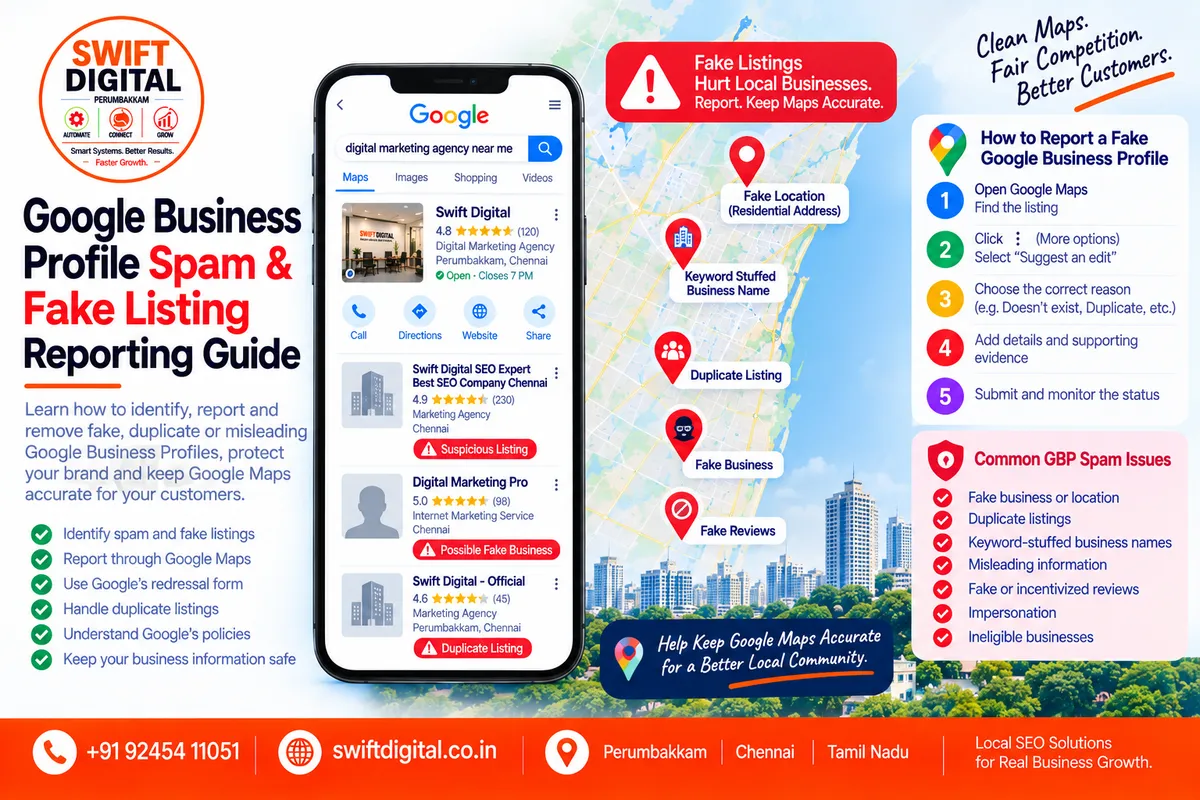
Google Business Profile Spam & Fake Listing Reporting Guide
Google Maps is an important source of information for local customers.
But inaccurate, duplicate, fake, or misleading business listings can create problems for both customers and legitimate businesses.
Examples include:
A business that doesn't actually exist
A fake location
A duplicate profile
A business using an incorrect name
A listing using misleading information
A competitor creating an ineligible listing
Fake reviews
Review manipulation
Incorrect phone numbers
Incorrect websites
Impersonation
Spam content
Google provides processes for reporting inappropriate or inaccurate Business Profiles and Maps content. Businesses and users can report certain listings through Google Maps, while some violations involving business name, phone number, website, or fraudulent activity can be submitted through Google's Business Profile redressal process.
This guide explains how to identify legitimate GBP spam and report it responsibly.
What Is Google Business Profile Spam?
Google Business Profile spam generally refers to information or activity that violates Google's Business Profile or Google Maps policies.
Google's guidelines require businesses to accurately represent themselves and prohibit misleading information and prohibited behavior.
Spam can include several different situations.
Examples
Fake businesses
Ineligible businesses
Fake locations
Duplicate listings
Keyword-stuffed business names
Misleading information
Fake engagement
Review manipulation
Impersonation
Fraudulent activity
Not every competitor listing is spam.
A business ranking above yours is not, by itself, evidence of a policy violation.
The appropriate approach is to identify a specific policy issue and provide accurate evidence.
Why Does Google Business Profile Spam Matter?
Incorrect listings can affect customers who rely on Google Maps to make decisions.
A customer may:
Call the wrong number
Visit the wrong address
Contact the wrong company
Encounter a closed business
Be directed to a misleading website
Confuse two different businesses
For legitimate businesses, inaccurate listings can also create operational and reputation problems.
Google states that accurate business information on Search and Maps is important for businesses and customers.
The Most Important Rule: Don't Report a Competitor Just Because They Rank Higher
This is extremely important.
A competitor appearing above your business does not automatically mean they are violating Google's policies.
For example:
Competitor has more reviews.
That isn't necessarily spam.
Competitor ranks above you.
That isn't necessarily spam.
Competitor has a different category.
That isn't necessarily spam.
Competitor has better photos.
That isn't necessarily spam.
A legitimate competitor should not be reported simply because you want their listing removed.
Instead, identify an actual policy violation.
Common Types of Google Business Profile Spam
1. Fake Business
A listing may be fake if the business doesn't actually exist.
Google allows users to request removal of a Business Profile that never existed or isn't eligible for Google.
Possible evidence
No business at the listed address
No legitimate business website
Phone number doesn't connect to the claimed business
Address appears unrelated
Business cannot be verified through credible sources
One piece of evidence may not be enough.
Investigate carefully before reporting.
2. Fake Location
A business may create a location in a city where it doesn't actually operate.
For example, a company with one legitimate office might create additional profiles at:
Virtual offices
Mailboxes
Residential addresses
Unstaffed locations
Locations where it doesn't operate
Google's guidelines require businesses to accurately represent their real-world operations and use accurate addresses or service areas.
3. Keyword-Stuffed Business Name
A business name should reflect the real-world name used by the business.
For example, suppose the real business name is:
Swift Dental
A listing named:
Swift Dental Best Dentist Chennai Dental Clinic Cheap Dentist Near Me
could be a potential guideline violation if those words aren't actually part of the real-world business name.
Google explicitly says unnecessary information in a Business Profile name isn't permitted and can result in suspension.
Important
Don't report a business name simply because you personally dislike it.
Look for evidence that the profile name doesn't represent the real-world business name.
4. Duplicate Business Profile
A business generally shouldn't have multiple profiles representing the same location.
Google's guidelines state:
There should only be one profile per business.
Duplicate profiles can create confusion in Search and Maps.
Example
The same physical location may have:
ABC Dental
ABC Dental Clinic
ABC Dental Chennai
ABC Dental Best Dentist
If all represent the same eligible location, investigate whether they are duplicates rather than assuming each is legitimate.
5. Ineligible Business
Not every type of business qualifies for a Business Profile.
Google's eligibility guidance requires businesses to have appropriate in-person customer contact during stated hours, subject to Google's stated exceptions.
Potentially problematic examples can include certain:
Online-only businesses
Lead-generation operations
Businesses without eligible customer contact
Fake locations
Businesses misrepresenting their operations
Eligibility should always be checked against Google's current guidelines rather than based on assumptions.
6. Virtual Office Used as a Fake Location
A virtual office isn't automatically an eligible business location.
Google's Business Profile guidelines address virtual offices and require the business to meet the relevant eligibility requirements.
If you suspect a profile is using a virtual office improperly, document the specific facts rather than simply assuming the address is invalid.
7. Misleading Business Information
Google prohibits misleading or deceptive representations.
Examples can include:
Incorrect business identity
Misleading descriptions
False claims
Incorrect contact information
Misleading location information
Misrepresentation of services
Google's prohibited-content policy says misleading information and misrepresentation are not allowed on Google Maps.
8. Fake Reviews
Fake reviews are another major category of Google Maps abuse.
Google prohibits fake engagement.
This includes content that:
Doesn't represent a genuine experience
Is paid for
Is posted from multiple accounts at someone's request
Attempts to manipulate ratings
Uses incentives for reviews
Attempts to manipulate review volume or rating patterns
9. Incentivized Reviews
Businesses shouldn't offer:
Money
Discounts
Free products
Free services
Gifts
in exchange for reviews.
Google specifically prohibits incentives for posting, revising, or removing reviews.
10. Review Manipulation
Examples of potentially prohibited manipulation include:
Buying reviews
Posting reviews from employees to influence ratings
Asking people to post reviews despite not having a genuine experience
Creating multiple accounts to boost ratings
Paying for positive reviews
Coordinating review campaigns designed to manipulate ratings
Google says genuine reviews can be requested, provided businesses don't offer incentives or attempt to influence the rating or content.
11. Competitor Review Attacks
A business should not post reviews on a competitor's profile simply to damage its reputation.
Google explicitly includes content posted on a competitor's business to undermine that business or its product within its fake-engagement policy.
12. Impersonation
Google Maps should not be used to impersonate another person, company, organization, or authoritative source.
Potential examples include:
Copying another company's identity
Using another company's branding to deceive customers
Pretending to be an official business
Misrepresenting affiliation
Google's prohibited-content policy specifically addresses impersonation.
How to Investigate a Suspected Spam Listing
Before reporting a profile, gather evidence.
Step 1 — Search Google Maps
Find the profile and record:
Business name
Address
Phone
Website
Category
Photos
Reviews
Opening hours
Step 2 — Check the Business Website
Ask:
Does the business have a legitimate website?
Does the website show the same address?
Does the phone number match?
Is the business name consistent?
Does the website identify the location?
Don't assume that a missing website automatically means the profile is fake.
Step 3 — Check the Address
Look at the physical location.
Possible warning signs include:
Empty property
Residential address with no evidence of eligible operations
Mailbox
Shared office
Virtual office
Completely unrelated business
Address that doesn't match the claimed operation
Again, investigate before reporting.
Step 4 — Check the Business Name
Compare the GBP name with:
Website
Signage
Official documents where publicly available
Social profiles
Other legitimate business sources
Google says the Business Profile name should reflect the business's real-world name.
Step 5 — Check the Phone Number
Call only when appropriate and safe.
Check whether the number appears to belong to the claimed business.
A different number isn't automatically evidence of spam because businesses can use:
Call centers
Centralized phone systems
Tracking systems
Franchise contact numbers
Look at the overall evidence.
Step 6 — Check for Duplicates
Search:
Business Name + City
Business Name + Address
Business Phone
Business Website
Then inspect Google Maps for multiple profiles representing the same location.
Step 7 — Document the Specific Violation
Instead of writing:
"This competitor is spam."
write something factual such as:
"The profile appears to represent a second listing for the same physical address. The address, phone number and website match the existing profile."
This gives Google a specific issue to investigate.
How to Report a Fake Business on Google Maps
Google currently provides a Maps process for requesting removal of a Business Profile that appears inaccurate or ineligible.
General process
Open Google Maps.
Find the business.
Select the business.
Choose Suggest an edit.
Select the appropriate option.
Provide accurate information.
Submit the edit.
Google's current documentation gives examples such as:
Doesn't exist here
Place is closed
Offensive, harmful, or misleading
The exact options can vary depending on the situation.
When to Use Google's Business Redressal Process
Google provides a separate Business Profile redressal complaint process for certain incorrect information or fraudulent activity involving:
Business name
Phone number
Website
Other business information
Google specifically directs users to the Business Profile redressal complaint form for these types of reports.
This is particularly useful when you have specific evidence of a policy violation.
Reporting a Duplicate Listing
If you find a duplicate:
First determine:
Is it the same physical location?
Is it actually the same business?
Does the business legitimately operate separate departments?
Is there a legitimate reason for multiple listings?
If it is clearly a duplicate, use Google Maps' reporting/edit process.
Google's documentation has historically provided options for reporting a place with another listing, while current Maps workflows may present the relevant option differently.
Reporting a Fake Review
If a review violates Google's policies, you can report it.
Current process
Open your Business Profile.
Select Read reviews.
Find the review.
Select Report.
Choose the relevant reason.
Submit the report.
Google emphasizes that only reviews that violate its policies are eligible for removal. A negative review is not automatically removable simply because a business disagrees with it.
What If Google Doesn't Remove the Review?
Google says that if a reported review is evaluated and no policy violation is found, eligible businesses can submit a one-time appeal.
Possible statuses include:
Decision pending
Report reviewed — no policy violation
Escalated
Don't repeatedly report the same review simply because you don't like the outcome.
What If a Competitor Has Fake Reviews?
Don't respond with fake reviews of your own.
Instead:
Identify the specific reviews.
Document why they appear to violate policy.
Report them.
Use Google's review management process.
Appeal where the process allows it.
Google's fake-engagement policy prohibits paid, incentivized, biased, or otherwise inauthentic review activity.
Don't Create Fake Reviews to Fight Spam
This is extremely important.
If a competitor is manipulating reviews, the answer is not to manipulate reviews against them.
Don't:
Buy reviews
Create fake accounts
Ask employees to post reviews
Post reviews on competitors
Pay customers
Offer discounts for reviews
Coordinate fake review campaigns
Google states that fake engagement and rating manipulation can result in removal of content and other restrictions.
What Happens After You Report a Business?
Google reviews reports and may request additional information.
A report doesn't guarantee removal.
Google may determine that:
The listing is legitimate
The business is eligible
The information is correct
More evidence is required
A policy violation exists
If Google approves the request, the business may be removed from Search and Maps where the relevant removal criteria are met.
How Long Does a Spam Report Take?
There isn't a universal guaranteed timeframe for every Business Profile report.
Some reports may require additional review or evidence.
Don't promise a client:
"Google will remove the listing within 24 hours."
Instead say:
"We'll submit the appropriate report with supporting evidence and monitor Google's response."
What Evidence Should You Collect?
Create a simple evidence file.
Recommended information
Business name:
ABC Company
Google Maps URL:
Profile URL
Issue:
Potential duplicate
Evidence:
Same address
Same phone number
Same website
Existing legitimate profile
Screenshots
Date checked:
September 2026
This creates a clean audit trail.
Spam Reporting Evidence Checklist
Before submitting:
Google Maps URL
Business name
Address
Phone number
Website
Screenshots
Existing legitimate profile if applicable
Specific policy concern
Supporting evidence
Date of investigation
What Not to Include in a Spam Report
Avoid emotional statements such as:
"They are stealing my rankings."
"They are terrible SEO people."
"They don't deserve to rank."
"Remove them immediately."
These statements don't establish a policy violation.
Instead provide factual evidence.
Example of a Strong Report
Weak
This competitor is cheating and should be removed.
Better
This listing appears to duplicate another Business Profile at the same physical address. Both profiles display the same business name, phone number and website. The attached screenshots show the two listings.
The second version gives Google a specific issue to investigate.
Google Business Profile Spam Audit Template
You can use this table for client audits.
Check | Status | Evidence | Action |
|---|---|---|---|
Fake location | — | — | Investigate |
Duplicate | — | — | Report if confirmed |
Keyword-stuffed name | — | — | Verify real-world name |
Fake reviews | — | — | Report policy violations |
Wrong phone | — | — | Suggest correction |
Wrong website | — | — | Suggest correction |
Ineligible business | — | — | Investigate eligibility |
Misleading information | — | — | Document evidence |
Impersonation | — | — | Report |
Closed business | — | — | Suggest appropriate edit |
Competitor Spam Audit: What to Look For
For legitimate competitive research, you can review:
Business information
Name
Address
Phone
Website
Profile configuration
Category
Services
Hours
Attributes
Reputation
Review count
Review patterns
Review content
Website
Location pages
Service pages
Local content
But distinguish between:
Competitive weakness
and
Policy violation.
A competitor having a stronger website isn't spam.
A competitor having more reviews isn't spam.
A competitor ranking above you isn't spam.
A specific policy violation is what matters.
Common GBP Spam Mistakes Businesses Make
Mistake 1: Reporting Every Competitor
Don't.
Investigate actual violations.
Mistake 2: Reporting Negative Reviews Automatically
A negative review can be legitimate.
Google says businesses shouldn't report reviews simply because they disagree with them or dislike them.
Mistake 3: Creating Counter-Spam
Never respond to spam with spam.
Mistake 4: Making Unsupported Accusations
Use evidence.
Mistake 5: Filing Repeated Reports Without New Information
If the evidence hasn't changed, repeatedly submitting the same claim is unlikely to solve the underlying issue.
Mistake 6: Hiring Anyone Who Promises Guaranteed Removal
Be cautious of agencies or individuals claiming they can guarantee Google's decision.
Google's third-party policies prohibit misleading or unrealistic claims, including guarantees of top placement.
Protect Your Own Google Business Profile
Spam fighting is only half the strategy.
You should also protect your own profile.
Keep your information accurate
Maintain:
Real business name
Correct address
Correct service area
Correct phone
Correct website
Accurate categories
Accurate services
Google's guidelines emphasize accurate business representation.
Keep Ownership With the Business
If you use an agency, make sure the business owner retains appropriate ownership/control.
Google's eligibility and third-party guidance says authorized representatives should work directly with the business owner, keep the owner informed, and transfer ownership when requested.
This is particularly important during:
Agency changes
Staff changes
Website changes
Suspensions
Verification problems
Watch for Google Impersonation Scams
Some people claim to be Google representatives and demand payment for:
Verification
Reinstatement
Maintaining a listing
Improving rankings
Google warns about impersonation scams and states that Google doesn't charge for Business Profile support or request OTPs/PINs for these purposes.
Never give an unknown person your:
Password
OTP
PIN
Recovery code
Third-Party Agency Warning Signs
Be cautious if an agency promises:
"Guaranteed #1 Google Maps ranking."
or:
"We can remove any competitor."
or:
"Pay us and Google will reinstate you."
or:
"We have a secret Google connection."
Google's third-party policy specifically prohibits false, misleading, or unrealistic claims such as guarantees of top placement.
A responsible agency should explain what it can control and what depends on Google's systems.
30-Day Google Maps Spam Monitoring Plan
Days 1–7 — Baseline
Search your primary local queries.
Record:
Competitors
Profile names
Addresses
Categories
Potential duplicates
Suspicious listings
Don't report anything yet unless the violation is already clear.
Days 8–14 — Investigate
For suspicious listings:
Check websites
Check addresses
Check phone numbers
Check business identity
Check duplicate profiles
Review policy requirements
Document evidence.
Days 15–21 — Report Valid Violations
Submit reports only where you have a reasonable policy basis.
Use:
Google Maps reporting
Business Profile redressal process
Review reporting tools
depending on the type of issue.
Days 22–30 — Monitor
Track:
Report status
Google responses
Listing changes
Review decisions
New spam
Changes to your own profile
Then establish a monthly monitoring process.
Monthly GBP Spam Monitoring Checklist
Your Profile
Business name unchanged
Address correct
Phone correct
Website correct
Category correct
No unauthorized changes
Reviews monitored
Competitor Environment
New suspicious listings
Duplicate listings
Fake locations
Keyword-stuffed names
Suspicious review activity
Impersonation
Misleading information
Security
Owner access verified
Managers reviewed
2-Step Verification enabled
Suspicious emails checked
No unauthorized agency access
Frequently Asked Questions
Can I report a fake Google Business Profile?
Yes. Google provides ways to report inaccurate, ineligible, fake, spam, or misleading business listings through Google Maps and its Business Profile reporting processes.
Can I report a competitor?
You can report a competitor if you identify a genuine policy violation. Simply being a competitor, ranking above you, or having more reviews isn't sufficient.
Can I report a duplicate listing?
Yes, if you have evidence that multiple profiles represent the same location or otherwise violate Google's guidelines.
Can I report a business with a keyword-stuffed name?
If the name doesn't reflect the business's real-world name, it may violate Google's guidelines. Document the evidence and use the appropriate reporting process.
Can a negative review be removed?
Only if it violates Google's policies. Google explicitly says disagreement with a review isn't sufficient reason for removal.
Can I report fake reviews?
Yes, when you have reason to believe they violate Google's review policies. Google prohibits fake engagement and rating manipulation.
Does reporting guarantee removal?
No. Google evaluates reports and determines whether the applicable policy or eligibility criteria are met.
Can I create another profile to compete with a spam listing?
No. Don't create fake or duplicate profiles. Fix your own profile and report genuine violations through Google's processes.
Should I hire someone who guarantees competitor removal?
Be cautious. Google warns against third parties making false or unrealistic claims about Google services and rankings.
Final Thoughts
Google Business Profile spam should be handled with evidence, accuracy and patience.
The objective isn't to remove competitors.
The objective is to help maintain accurate information on Google Maps and protect customers from misleading or ineligible listings.
A responsible local SEO process looks like this:
Identify → Investigate → Document → Report → Monitor
Don't retaliate with fake reviews, fake listings or other manipulative tactics.
Instead, build a legitimate profile, maintain accurate business information, collect genuine customer feedback, protect account access, and report clear policy violations through Google's official channels.
That is the sustainable approach to Google Maps and local SEO.


