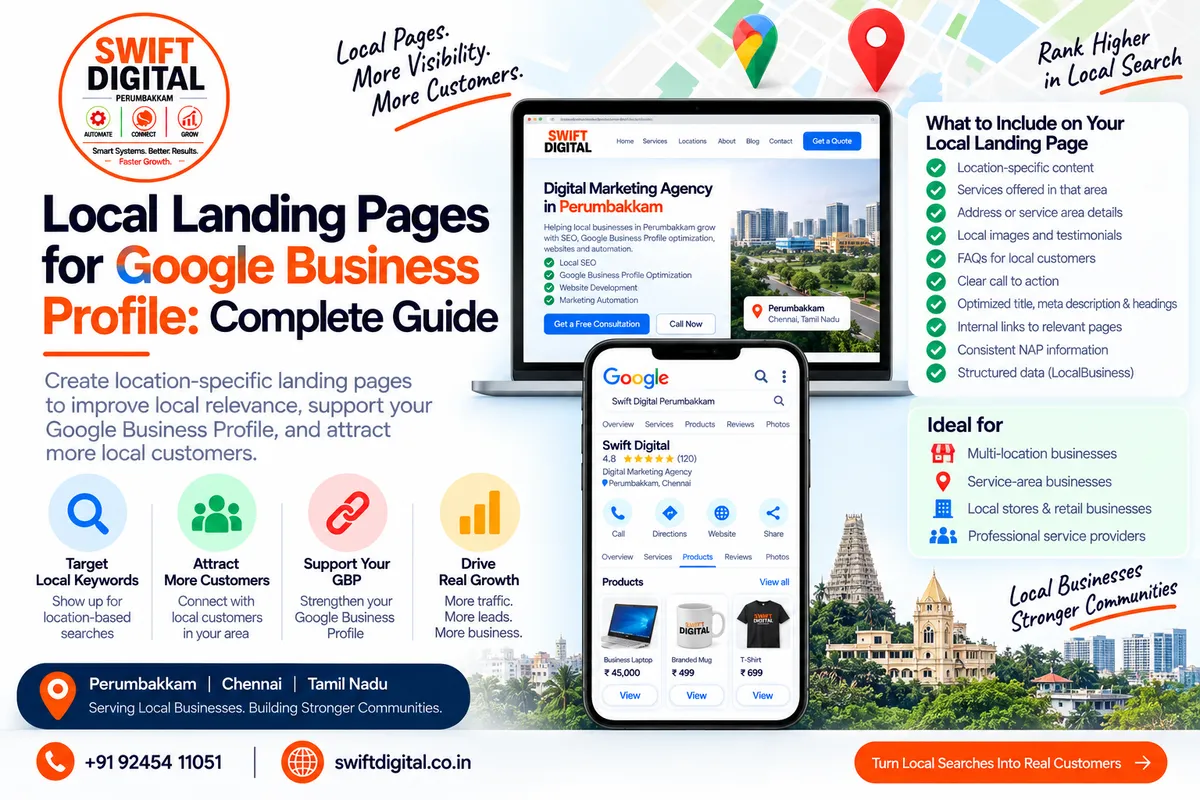
Local Landing Pages for Google Business Profile: Complete Local SEO Guide
A well-optimized Google Business Profile is an important part of local search visibility, but your website also plays a major role in helping customers understand what your business offers and where you operate.
One useful strategy is creating local landing pages that provide detailed information about a specific location, service, or service area.
When created correctly, these pages can support your Google Business Profile and broader local SEO strategy by making your website more relevant to the searches your customers actually perform.
However, creating dozens of nearly identical city pages simply to target keywords is not a sustainable strategy.
The goal should be to create useful, unique pages for real customers and real locations you genuinely serve.
What Is a Local Landing Page?
A local landing page is a website page designed around a specific:
Location
City
Neighborhood
Service area
Business location
Service + location combination
For example, a digital marketing agency might have a page such as:
Digital Marketing Agency in Perumbakkam
A business with multiple genuine physical locations might have separate location pages such as:
Digital Marketing Agency in Chennai
Digital Marketing Agency in Bengaluru
Digital Marketing Agency in Hyderabad
Each page should provide meaningful information about that particular location.
A local landing page should not simply replace the city name in an otherwise identical template.
Why Local Landing Pages Matter for GBP
Google says local results are primarily influenced by relevance, distance, and prominence. Google also recommends providing complete and accurate business information.
Your website can complement the information in your Business Profile by explaining:
What services you provide
Which locations you genuinely serve
Who your customers are
How customers can contact you
What makes your business relevant to the area
What services are available at a particular location
This creates a stronger connection between your Business Profile, website, and customer search intent.
Important distinction
A local landing page does not guarantee higher Google Maps rankings.
Google's local ranking system considers multiple factors, including relevance, distance, and prominence.
Think of the landing page as one component of a broader local SEO system.
Local Landing Pages vs. Your Main Website Page
Your homepage generally describes the business as a whole.
A local landing page provides more focused information.
For example:
Homepage
Swift Digital — Digital Marketing Agency
General information about the company, services, team, and overall business.
Local Landing Page
Digital Marketing Agency in Perumbakkam
More specific information about:
Services available in Perumbakkam
Nearby areas served
Local customer needs
Contact information
Directions or location information where applicable
Relevant local examples
FAQs
Local proof or testimonials when legitimately available
This gives users a more focused experience.
When Should You Create a Local Landing Page?
Not every business needs dozens of location pages.
Create a local page when there is a genuine reason for the page to exist.
Good reasons include:
1. You have a physical business location
If customers can actually visit your business, a dedicated location page can provide useful information about that location.
Google's guidelines require businesses to accurately represent their real-world location and information.
2. You genuinely serve a particular area
Service-area businesses can identify the cities or areas they actually serve.
Google currently allows service-area businesses to specify up to 20 service areas using cities, postal codes, or other areas.
A website can provide additional useful information about those services.
3. You have multiple genuine locations
A multi-location company can create an individual page for each real business location.
Each page should contain information specific to that location rather than being a copy of another location page.
What Should a Local Landing Page Include?
A strong local landing page should answer the questions customers have before contacting the business.
Here is a practical structure.
H1: Primary Service + Location
Example:
Digital Marketing Agency in Perumbakkam
Keep the heading natural.
Do not repeatedly insert the same keyword throughout the page.
Introduction
Briefly explain:
Who the business is
What service it provides
Where it operates
Who the service is for
Example:
Swift Digital provides digital marketing and automation solutions for businesses in Perumbakkam and surrounding areas. Our services include local SEO, Google Business Profile optimization, website solutions, and marketing automation.
The exact wording should reflect the real business.
Explain Your Services
Create sections for the services that are actually offered in that location.
For example:
Google Business Profile Optimization
Explain what you provide.
Local SEO
Describe the local SEO services available to customers.
Website Development
Explain the website services offered.
Marketing Automation
Describe relevant automation solutions.
Don't create service sections simply to insert keywords.
The content should help customers understand the actual service.
Include Location-Specific Information
This is where a local page should become genuinely useful.
Depending on the business, you might include:
Address
Neighborhood
Service area
Nearby areas
Opening hours
Parking information
Directions
Contact details
Delivery information
Appointment information
Areas regularly served
For a storefront, provide accurate location information.
For a service-area business, don't invent an office or address simply to target a city.
Google specifically states that service-area businesses should use their actual business setup and should not use virtual offices as locations.
Add Local Proof
Local proof can make a page considerably more useful.
Examples include:
Genuine customer testimonials
Case studies
Completed projects
Local client examples
Original photographs
Community involvement
Relevant local experience
Only use real information.
Don't create fake customers, fake testimonials, fake projects, or fabricated local experience.
Add Original Photos
For a physical location, consider using original photographs such as:
Exterior
Interior
Team
Products
Services
Signage
Workspace
For service-area businesses, photographs of the actual team, work, equipment, or completed projects can provide useful context.
Images should represent the real business.
Add a Clear Call to Action
The page should make it easy for visitors to take the next step.
Examples:
Call Us
Request a Quote
Book an Appointment
Get Directions
Contact Our Team
Request a Consultation
The CTA should correspond to an actual action the business supports.
Connect the Landing Page to Your Google Business Profile
Your Business Profile should contain the correct website URL for the business.
Google allows businesses to provide their website on their Business Profile, provided the URL represents the individual business location.
For businesses with multiple locations, location-specific website pages can provide a more relevant destination for users.
Google's business-link guidance also states that local business links should lead to dedicated landing pages for the relevant business/location rather than generic or unrelated pages.
Build Internal Links
Don't leave your local landing page isolated.
Connect it to relevant pages throughout your website.
For example:
Homepage → Location Page
Location Page → Service Page
Service Page → Location Page
Blog Post → Service Page
Blog Post → Location Page
This creates a logical website structure.
Example Internal Linking Structure
Imagine a digital marketing company serving Chennai.
Your structure could look like:
Homepage
│
├── Services
│ ├── Local SEO
│ ├── Google Business Profile Optimization
│ ├── Website Development
│ └── Marketing Automation
│
├── Locations
│ ├── Perumbakkam
│ ├── Medavakkam
│ ├── Sholinganallur
│ └── Chennai
│
└── Blog ├── Google Maps SEO ├── GBP Reviews ├── GBP Services └── GBP Products
The actual structure should reflect the locations and services the business genuinely supports.
Local Landing Page URL Structure
Keep URLs short and understandable.
Examples:
/services/local-seo/or:
/locations/perumbakkam/or:
/digital-marketing-agency-perumbakkam/Choose a structure that can scale.
For a multi-location business, a directory structure such as:
/locations/chennai/can make the site easier to manage.
Optimize the Title Tag
A useful title could be:
Digital Marketing Agency in Perumbakkam | Swift Digital
Avoid unnecessarily long titles.
The title should accurately describe the page.
Write a Useful Meta Description
Example:
Digital marketing, local SEO, Google Business Profile optimization and automation services for businesses in Perumbakkam and nearby areas.
The description should describe the page rather than simply repeating keywords.
Use One Clear H1
For example:
Digital Marketing Agency in Perumbakkam
Then use H2 headings for supporting topics:
Digital Marketing Services
Local SEO Services
Google Business Profile Optimization
Areas We Serve
Why Choose Us
Frequently Asked Questions
Contact Us
Add Relevant Structured Data
Structured data can help search engines understand the content and business information on a page.
Google recommends using the most specific applicable LocalBusiness subtype and following its structured-data guidelines.
For a local business website, relevant information may include:
Business name
Address
Telephone
URL
Opening hours
Business type
The markup should accurately represent visible and applicable information.
Structured data is not a guarantee of enhanced search visibility.
Keep NAP Information Consistent
NAP means:
Name
Address
Phone
Your important business information should be accurate and consistent across relevant online properties.
Google's Business Profile guidelines emphasize accurately representing the business and using an accurate address and/or service area.
Check consistency between:
Google Business Profile
Website
Local directories
Social profiles
Business listings
Organization information
Don't Create Doorway Pages
One of the biggest mistakes in local SEO is creating hundreds of almost identical pages:
/service-chennai
/service-madurai
/service-coimbatore
/service-bangalore
/service-hyderabad
...
If the pages contain essentially the same content with only the city name changed, they provide little additional value.
Instead, create a page when you have something genuinely useful to say about that location.
Avoid Keyword Stuffing
Don't write:
Digital marketing agency in Perumbakkam provides digital marketing services in Perumbakkam for businesses looking for a digital marketing agency in Perumbakkam.
This is unnatural and provides a poor user experience.
Instead:
We help businesses in Perumbakkam improve their online presence through local SEO, Google Business Profile optimization, websites, and marketing automation.
Use keywords naturally.
Don't Create Fake Locations
Never create a location page to imply that you have an office somewhere when you don't.
Google's guidelines require businesses to accurately represent their real-world business location and service area.
A website page cannot turn a virtual office, mailbox, or imaginary location into a legitimate business location.
Service-Area Businesses Need a Different Approach
Service-area businesses often work across several cities without having customer-facing offices in each one.
For example:
Plumber based in Chennai
Service areas:
Perumbakkam
Medavakkam
Sholinganallur
Velachery
The website can explain where the business actually provides services.
However, don't create fake storefronts in every service area.
Google says service-area businesses can have one profile for the area they serve, subject to its eligibility and service-area rules.
Local Landing Pages for Multiple Locations
If your company has legitimate locations in multiple cities, create a dedicated page for each.
For example:
/locations/chennai/
/locations/bengaluru/
/locations/hyderabad/
Each page should have:
Correct location information
Location-specific contact information where applicable
Relevant services
Original content
Local photographs
Location-specific FAQs
Local testimonials where genuine
Correct opening hours
Appropriate internal links
Don't simply copy one location page and change the city name.
Local Landing Page Content Template
You can use this structure as a starting point:
H1: [Primary Service] in [Location]
Short introduction.
About Our [Location] Service
Explain the business and local service.
Our Services
List relevant services.
[Service 1]
Description.
[Service 2]
Description.
[Service 3]
Description.
Why Customers Choose Us
Explain genuine differentiators.
Areas We Serve
List actual service areas.
Local Customer Questions
Answer common questions.
Customer Reviews / Case Studies
Include genuine proof where available.
Contact Us
Add appropriate contact options.
Frequently Asked Questions
Answer useful location/service questions.
Local FAQ Ideas
Questions will vary by industry.
Examples:
Do you provide services in [Location]?
Answer accurately.
How quickly can you reach customers in [Location]?
Only provide realistic information.
What services do you provide in [Location]?
Explain your actual services.
Do customers need an appointment?
Explain your process.
Where are you located?
Provide your actual business location if customers visit you.
Do you serve nearby areas?
List genuine service areas.
Use Google Business Profile Data Carefully
Your website and Business Profile should tell a consistent story.
Compare:
Information | GBP | Website |
|---|---|---|
Business name | Accurate | Accurate |
Phone | Current | Current |
Address | Correct | Correct |
Hours | Current | Current |
Services | Relevant | Relevant |
Service areas | Accurate | Accurate |
Website URL | Correct | Correct |
Google also uses information from multiple sources when generating local business information, so maintaining accurate business information across the web is important.
Local Landing Pages and Google Maps SEO
A local landing page is only one part of a Maps SEO strategy.
A broader strategy should include:
Correct primary category
Appropriate additional categories
Accurate business information
Relevant services
Genuine customer reviews
Review responses
High-quality photographs
Accurate service areas
Useful website content
Local authority and mentions
Consistent business information
Google identifies relevance, distance, and prominence as the main factors behind local results.
Track Landing Page Performance
After publishing a local landing page, monitor its performance.
Useful metrics include:
Organic impressions
Organic clicks
Search queries
Click-through rate
Organic conversions
Phone calls
Form submissions
Appointment requests
Engagement
GBP website actions
Google Search Console can help you understand how pages perform in Google Search.
Your Google Business Profile Performance data can provide additional information about interactions with the Business Profile itself.
30-Day Local Landing Page Plan
Week 1 — Research
Day 1
List your actual business locations and service areas.
Day 2
Identify your most important services.
Day 3
Research customer search intent.
Day 4
Review existing website pages.
Day 5
Identify content gaps.
Day 6
Plan URL structure.
Day 7
Create the page outline.
Week 2 — Content
Day 8–10
Write the first local landing page.
Day 11
Add service information.
Day 12
Add local information.
Day 13
Add genuine proof and photographs.
Day 14
Write FAQs and CTA sections.
Week 3 — SEO
Day 15
Optimize title and meta description.
Day 16
Review H1/H2 structure.
Day 17
Add internal links.
Day 18
Review NAP information.
Day 19
Check structured data.
Day 20
Optimize images.
Day 21
Check mobile usability.
Week 4 — Launch & Measure
Day 22
Publish the page.
Day 23
Check indexing.
Day 24
Connect relevant internal links.
Day 25
Review Google Business Profile website information.
Day 26
Check conversions.
Day 27
Review Search Console data.
Day 28
Identify content improvements.
Day 29
Fix technical issues.
Day 30
Create the next priority page.
Local Landing Page Checklist
Before publishing, check:
Real location or service area
Useful original content
Clear H1
Relevant title tag
Unique meta description
Accurate NAP
Relevant services
Local information
Genuine photographs
Internal links
Clear CTA
Useful FAQs
Mobile-friendly design
Fast page experience
Appropriate structured data
No keyword stuffing
No fake location
No copied city pages
No misleading claims
Common Local Landing Page Mistakes
1. Creating pages for every city
More pages do not automatically mean better local SEO.
2. Copying the same content
Each page should provide genuine value.
3. Using fake addresses
This can conflict with Google's Business Profile guidelines.
4. Keyword stuffing
Write for people first.
5. Ignoring conversion
A page should help visitors take action.
6. Forgetting internal links
Connect location pages to relevant services and supporting content.
7. Publishing without measurement
Track performance and improve the pages over time.
Frequently Asked Questions
Do I need a local landing page for every city I serve?
No. Create pages where there is enough genuine, useful information to justify a dedicated page.
Will a local landing page improve my Google Maps ranking?
It can support the broader local SEO strategy, but it does not guarantee a particular Maps ranking. Google says local results primarily depend on relevance, distance, and prominence.
Should service-area businesses create pages for every service area?
Not necessarily. Only create pages that provide substantial, useful information about the services actually offered in that area.
Can I create a page for a city where I don't have an office?
You should not represent a city as a physical business location when you do not actually operate there. If you genuinely serve the area as a service-area business, describe that service accurately instead.
Should every location page have the same content?
No. Basic business information may be similar, but the page should contain meaningful information specific to that location.
Should I add LocalBusiness schema?
Where applicable, structured data can help Google understand business information. Google recommends using the most specific appropriate LocalBusiness subtype and following its structured-data guidelines.
Final Thoughts
Local landing pages work best when they solve a real local customer's problem.
The objective isn't to create hundreds of pages containing location keywords. The objective is to create useful, accurate and locally relevant pages that connect your website, services, business information and customer needs.
A strong local SEO system brings together:
Google Business Profile + Website + Local Landing Pages + Reviews + Local Authority + Accurate Business Information
And remember the three core local ranking concepts identified by Google:
Relevance + Distance + Prominence.
Build pages for customers first, keep your business information accurate, and improve the website alongside your Google Business Profile.


